My department head put me on the spot today. At the monthly faculty meeting this afternoon I took notes with my Pulse gizmo. At the end of the meeting, Howard pointed to me gleefuly: “Ask Sorin what he is up to with that pen.” “Does that thing have headphones?” asked Jane incredulously nodding at the two wired ear buds connected to the pen. At least five other colleagues approached me with questions. I tried to explain that the device can record voice, scan handwriting, turn it into digital words, legible by a computer program, and that all can be wrapped into a “pencast” shareable with the world. The reaction was quite amazing. Everyone asked me to send them a link to the product and more explanations.
Below you will find a “pencast” of a presentation I have given on one of my projects (Visible Past) in one of my colleague’s classes. Click play to hear the sound track and to follow the note taking process in action (I asked a student to take notes for me).

What kind of device is this?
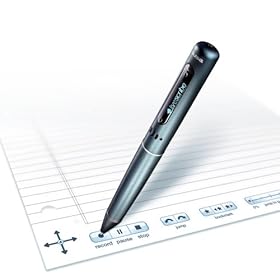
The Pulse (Livescribe) pen records your notes both as text (scan) and voice (lecture, talk, book on tape, etc., any sound at the time of your note taking). The notes (voice and scans) are stored during note taking on the pen itself. After you are done, you can connect the pen to your computer and upload the content (voice synchronized with the handwritten notes) either to your local machine or to the web. Once on the web, your notes become a “pencast”. The image of your notes is projected on the screen in gray. Upon pressing “Play” the voice recording starts rolling and the handwritten notes take a green hue, indicating at what point in the narration has the note been made.
However, it gets better than this. The written notes can be used as s navigation tool. You click at any point in the notes and the recording jump to that point. This is what I call “random access”. In addition, if your penmaship is decent, your notes will be digitized (words will be recognized not just as pictures, but also as ascii characters), meaning that you can search them using a search engine.This is ideal not just for note taking, but also for research (focus groups, interviews, etc).
Enjoy this demo. Feel free to comment on this page or to send me an email. Contact details on the about page.
Question: we are looking to create pencasts for our web site, how was the Adobe Flash replay you posted above created?
Pardon my naivete when it comes to creating Adobe/Macromedia Flash presentations. Any pointers welcome.
Best, Mark
Each pencast has an “embed” link in the left sidebar. Copy the code and drop it into your site.
Also, you can download the complete Pencast flash application, so that you can play it offline or publish anywhere you want (even send it as an email attachement). Here is the link to the Pencast download service on Pencaster.com:
http://pencaster.com/pencast-tools/download-export-pencasts-